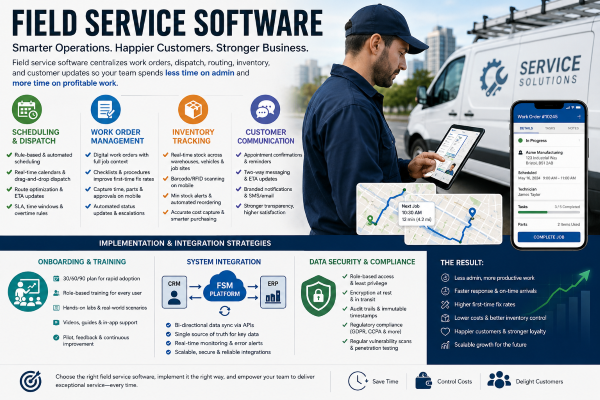
You run a field operation that depends on schedules, parts, and reliable communication, and field service software turns those moving pieces into a predictable system. It centralizes work orders, dispatch, routing, inventory, and customer updates so your team spends less time on admin and more time on profitable work.
This article Field Service Software breaks down what core features to expect, how those features drive efficiency, and practical strategies for integrating the software into your existing tools and workflows. Expect clear guidance to help you evaluate options, avoid common implementation pitfalls, and choose a solution that scales with your business.
Core Features and Functionality
You’ll find tools that assign the right technician, track job progress and parts, and keep billing and records accurate. Each feature reduces travel time, prevents stockouts, and improves first-time fix rates.
Scheduling and Dispatch
Use rule-based and automated scheduling to match technician skills, certifications, and proximity to jobs. Real-time calendars and drag-and-drop dispatch boards let you move assignments quickly when priorities change.
Optimize routes with integrated mapping and travel-time estimates so technicians arrive on time more often. You can set time windows, appointment types, and SLAs to enforce service-level commitments.
Enable mobile notifications and two-way messaging to confirm appointments and provide ETA updates. Include overtime rules and shift constraints to avoid violating labor policies when dispatching last-minute jobs.
Work Order Management
Create digital work orders that capture customer details, problem descriptions, required skills, and priority level. Link photos, diagnostic logs, and past service history so technicians get full context before arrival.
Use checklists and step-by-step procedures to standardize repairs and improve first-time-fix rates. Capture time, labor codes, and customer approvals on the mobile device to speed invoicing and reduce paperwork errors.
Automate status changes and escalations when orders miss SLA targets. Integrate with CRM and accounting systems to sync customer records, parts consumption, and billing data without manual reconciliation.
Inventory Tracking
Track inventory across warehouses, vehicles, and job sites with a single SKU-level system. Real-time stock visibility prevents dispatching technicians without required parts and lets you reserve items against scheduled work.
Use barcode or RFID scanning on mobile devices to record parts issued and returned. Implement minimum stock alerts and automated reordering rules to reduce stockouts and carrying costs.
Tie inventory consumption to work orders for accurate cost capture and replenishment forecasting. Include reporting on turnover, dead stock, and part-level margins to inform procurement decisions.
Implementation and Integration Strategies
Focus on practical steps you can take to get field teams productive quickly, connect the FSM platform to your back-office systems, and protect customer and operational data to meet regulatory and company requirements.
Onboarding and Training
Create role-based training paths for dispatchers, technicians, and managers. Start with a 30/60/90 plan: essential tasks and navigation in week 1, workflow and mobile use in month 1, optimization and advanced features by month 3. Use hands-on labs and scenario-based exercises that match your top 10 service call types so technicians practice real workflows.
Provide layered resources: short how-to videos, searchable step-by-step guides, and in-app tooltips. Track progress with completion checkpoints and skills assessments. Offer a pilot group of 10–20 users to validate training materials and gather feedback before full rollout. Schedule weekly office hours for the first 90 days to resolve questions and capture change requests.
System Integration with CRM and ERP
Map the core data flows: work orders, customer records, inventory, technician skills, and billing transactions. Define a single source of truth for each domain—for example, let the ERP own inventory and costing while the CRM owns customer master data. Document field-level mappings and frequency (real-time vs. batch) before development starts.
Use APIs and middleware for bi-directional sync and error handling. Implement message queuing for resilience and idempotent operations to prevent duplicates. Test integrations with a production-like sandbox, including volume tests for peak-day scenarios. Add monitoring dashboards and automated alerts for sync failures so your ops team can react within SLA windows.
Data Security and Compliance
Classify data by sensitivity: customer PII, financial transactions, technician credentials, and location telemetry. Apply least-privilege access controls and role-based permissions aligned to those classifications. Encrypt data at rest and in transit using current standards (TLS 1.2+/AES-256).
Maintain an audit trail for all critical actions—order changes, technician check-ins, and invoice approvals—with immutable timestamps. Ensure compliance with relevant regulations (e.g., GDPR, CCPA, sector-specific rules) by documenting data retention, consent, and deletion policies. Run regular vulnerability scans and quarterly penetration tests; remediate high-risk findings within defined SLAs.